HiVizz Security, an owner‑operated installer of 4K CCTV systems, offers free on‑site quotes across Bendigo, Ballarat, Geelong, Melbourne and the surrounding areas. We specialise in security solutions for both residential and commercial properties.
Why This 32MP All‑Weather Camera Works Well in Bendigo
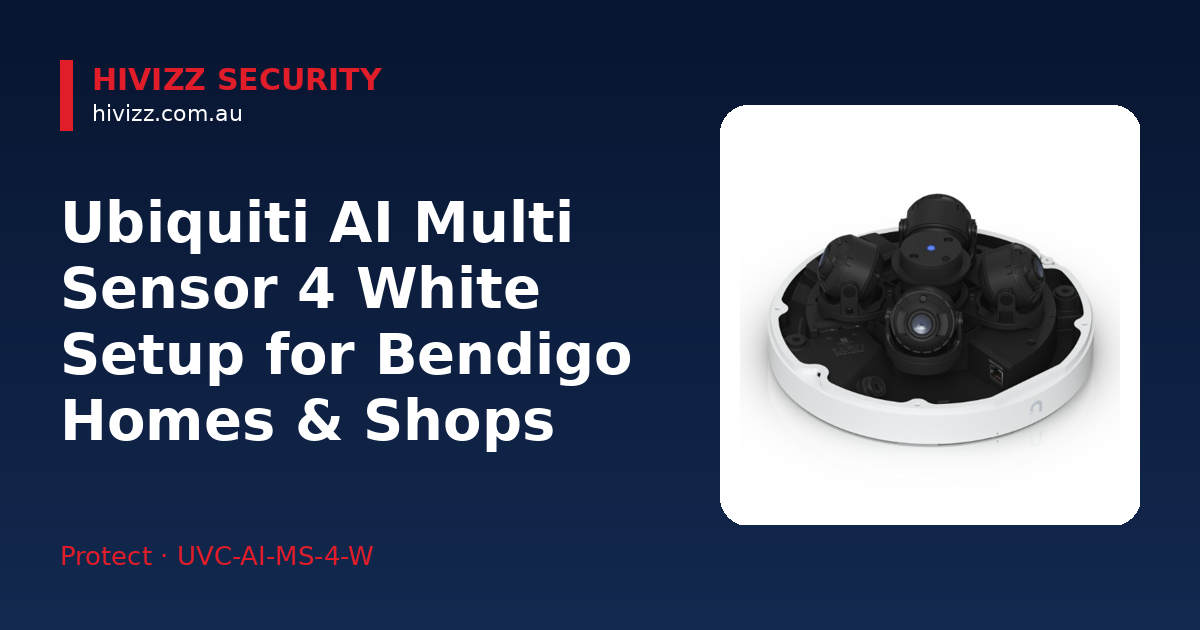
Bendigo’s weather swings from hot, dusty summers to heavy winter rain, so a camera needs solid protection. This model carries an IP66 rating, meaning it can shrug off water and dust. Its 360° infrared coverage watches every angle of a front yard or shop front after dark, without blind spots. The Multi‑TOPS AI engine can spot faces and licence plates, which is handy for neighbourhood safety or keeping an eye on deliveries.
Key Features & Specs
- Resolution: 32 MP – captures fine detail on faces and plates.
- Optical zoom: 2.33× per lens – zoom in without losing clarity.
- Four adjustable lenses: each can be set for a wide view or a close‑up focus.
- Tamper‑resistant IK10 housing: built to survive vandalism or accidental knocks.
- Weatherproofing: IP66 rating protects against rain, dust and extreme temperatures.
- Smart detections: AI can recognise people, vehicles and animals, plus face and licence‑plate detection.
These specs come straight from the manufacturer’s data sheet.
What You’ll Need for a Smooth Install
- PoE++ switch or injector: the camera draws power over Ethernet, so you’ll need a PoE++ (802.3bt) switch or a compatible injector.
- UniFi Protect controller or Dream Machine Pro: this acts as the video storage and management hub.
- Mounting hardware: the camera ships with a ceiling mount; you can also use pole, arm or pendant mounts.
- Cabling: Cat6a or higher is recommended to carry both power and data.
We can supply the right PoE switch, mount the camera securely and take care of all the wiring – just give us a call for a free quote within two business days.
Step‑by‑Step Setup for a Home or Small Shop
- Run PoE++ cable from your UniFi Protect controller or PoE++ switch to the camera location. Use outdoor‑rated cable if you’re routing it through the shop’s exterior.
- Mount the camera with the supplied ceiling bracket, or fit an optional pole/arm mount for a higher viewpoint. Aim the housing away from direct sunlight to reduce glare.
- Adopt the device in the UniFi Protect app (or web portal). It’s a one‑click “Add Device” process that registers the camera on your network.
- Set up AI detections: enable face and licence‑plate recognition and configure alerts for people, vehicles or animals as needed.
- Test night vision: switch to IR mode and confirm the 360° view gives a clear black‑and‑white picture. Fine‑tune each lens until you’re happy with the field of view.
If you’d rather not handle the wiring yourself, our certified technicians will do the job and walk you through viewing footage on your phone or computer.
When to Pick This Model Over Other Ubiquiti Cameras
- Need 32 MP detail: Ideal for identifying faces or reading plates; the resolution outperforms 4K or 8 MP models.
- Want 360° coverage: One device replaces multiple cameras when you need a full view of a shop front.
- Prefer built‑in AI: The Multi‑TOPS AI engine runs on the camera, so there’s no extra subscription or cloud service required.
If you’re on a tighter budget and don’t need ultra‑high detail, a single‑lens 4K Ubiquiti camera can still do the job, but you’ll lose the all‑around view and AI depth of the Multi Sensor 4.
Local Support & Warranty
We back every install with a 2-year warranty on products and a 1-year warranty on workmanship. As an Australian‑owned, owner‑operated business based in Marong, we understand local quirks – from NBN connectivity issues in Eaglehawk to dusty summer winds that can affect outdoor gear. Our certified technicians are ready to service, maintain or upgrade your system whenever you need it.
Frequently Asked Questions
Q: Can the camera run on a regular PoE switch? A: It needs PoE++ (802.3bt) to supply enough power for the 32 MP sensors and IR LEDs.
Q: How is footage stored and accessed? A: Video is saved on the UniFi Protect controller or Dream Machine Pro you choose during installation.
Q: Do I need a subscription for AI features? A: No. The Multi‑TOPS AI engine works locally on the camera, so there are no ongoing fees.
Q: Is the camera suitable for a shop window that gets a lot of sunlight? A: The IP66 housing protects against UV exposure, and you can angle the lenses to minimise glare.
Q: What if I need more cameras for a larger property? A: We can design a full UniFi Protect system that scales with additional Ubiquiti cameras, keeping everything centrally managed.
Next Steps – Get Your Free Quote Today
Give us a call at 0406 048 875 to arrange your free on‑site quote. Ready to secure your Bendigo home or shop with the Ubiquiti AI Multi Sensor 4 White? Contact HiVizz Security for a no‑obligation quote within two business days:
- Phone: 0406 048 875
- Email: [email protected]
- Order online: Ubiquiti AI Multi Sensor 4 White, All‑weather 32MP multi‑sensor camera, Multi‑TOPS AI, 2.33× optical zoom, 360° IR cover, 4x independent lenses
We’ll visit your property, discuss your security goals and provide a detailed, no‑obligation quote. Let HiVizz Security help you protect what matters most.